Cue vs. Manus: Which AI Agent is Right for You?
Choose by where your task starts: Cue brings voice input and supported Agent workflows to the app you are using; Manus offers a workspace for delegated tasks, with cloud, desktop, and browser capabilities. Neither label tells you whether the result is correct. Compare the context you must provide, the access you must grant, and the checks needed before using the output.
By the Cue team · Updated . This is a vendor-authored comparison based on current official documentation, not a head-to-head performance test. The exercises below are illustrative, not recorded product runs.
Start with the work, not the agent label
- Choose Cue for a voice-first handoff from the active app. For example, dictate a reply while reviewing an email, or turn checked meeting notes into a bounded Agent brief. You still choose the relevant context and review the result.
- Consider Manus for a research deliverable with a repeatable structure. Its Wide Research documentation describes splitting independent research items into parallel tasks and combining their output. Confirm sources and missing fields yourself; parallel execution does not establish accuracy.
- For local files or a signed-in website, compare both setups. Manus also documents local workflows: Manus Desktop documentation covers My Computer, while Browser Operator documentation covers an authorized browser session. Cue's supported actions depend on the installed app and permissions.
- Keep your existing tool when it already has the context. Typing or pasting a short, complete request into an open Agent may be simpler than adding another capture step. Cue adds value when speaking and gathering context across apps reduces your preparation effort—not merely because another model name is available.
Active-App and Screen Context
Cue can use the active app and screen as context in supported workflows, then prepare a draft or desktop action for you to review. Check the current Cue desktop app for supported workflows and permissions.
Published privacy boundary
Cue keeps local copies. When you sign in, thread messages and preferences sync through Cue. Relevant request context may be sent to service providers. See the Privacy Policy.
Reviewable Desktop Actions
Cue can use active-app and screen context to prepare a desktop action in a supported workflow. Review the proposed result before continuing and test the exact workflow you rely on.
Built-in Dictation
Use Cue Dictation in supported text fields, then check the inserted text. Defaults are Option on macOS and Right Alt on Windows; your installed app settings take priority. Dictation enters text—it does not automatically start an Agent task.
| Decision | Cue | Manus |
|---|---|---|
| Where the work begins | A focused text field for Dictation, or a supported Agent workflow with selected context and permissions. | Its task workspace; the agent overview describes a sandbox for delegated work. |
| Local work | Mac and Windows. Check the precise app, action, and requested permissions before using real data. | macOS and Windows; My Computer uses authorized folders and local commands. Review the documented approval controls and current setup. |
| Logged-in browser work | Active-app or screen context in supported workflows, with permission. A visible page is not permission to submit or change records. | Browser Operator connects a local browser and uses its existing sessions after authorization. The setup guide currently recommends Chrome and Edge. |
| Repeatable context | Prepare a checked brief with the goal, source excerpts, constraints, and expected output. Do not assume different Agents share all history. | Projects reuse instructions and files for tasks within a workspace. See the Projects documentation for sharing and update behavior. |
| Result acceptance | Check inserted wording, source coverage, and proposed actions before continuing. | Check deliverable sources, missing values, and resulting files or account state. A completed task is not proof of a correct result. |
| Plan and task cost | Free to start; Cue Plus is $19.99/month | Credit consumption depends on the task. Compare the current plans and usage documentation and your account, rather than a fixed price copied into a comparison. |
| Sensitive material | Local copies, signed-in thread sync, and request-time provider processing; read Cue's Privacy Policy. | Review the Manus Privacy Policy and your organization's rules before granting access. Local execution alone does not establish a privacy advantage for either product. |
What a fair trial should measure
- Preparation effort — Count the context you had to copy, dictate, select, attach, or authorize. Do not compare a fully prepared prompt in one product with an incomplete brief in the other.
- Corrections and rework — Note unsupported statements, omitted constraints, manual corrections, and duplicate actions. Keep the first draft, not just a polished final result.
- Usable output and cost — Record whether the result passed your checks, the task's actual usage charge, and the time you spent supervising. This page makes no speed or accuracy ranking.
Try the same follow-up brief in both tools
This illustrative exercise uses fictional notes, not a recorded Cue or Manus run or a benchmark. Start with checked text; if you obtained it from a recording, confirm participant consent, transcription accuracy, and permission to share it first.
1. Give both tools the same evidence
Source notes — fictional supplier follow-up:
Mira will send the revised quote by September 18, 2026.
Leon will review the security questionnaire; no deadline was agreed.
The launch date is undecided. Nobody approved a purchase.

Task: Draft a short internal follow-up, followed by an action table
with owner, action, due date, and supporting source sentence.
Keep unknown dates unknown; do not invent approvals.
Do not send messages, create or modify records, or contact the supplier.
Ask before using sources outside these notes.
2. Choose the input path deliberately
In Cue: use the supported Agent workflow in your installed app and provide the checked brief explicitly. If you instead use Dictation into another app, verify the inserted text before submitting there. A visible Agent or model in a selector does not prove it is connected, authorized, or available on your plan.
In Manus: submit the same text in a task. No browser session, local folder, or external account is required by this text-only exercise; do not grant those permissions just to compare drafts. Using Cue to enter text into Manus, where supported, is a separate input choice rather than a connector or shared subscription.
3. Accept only an evidence-preserving result
- Mira: revised quote, due September 18, 2026, linked to the first source sentence.
- Leon: security questionnaire review, deadline unknown. The draft should ask for a deadline, not reuse Mira's date.
- Launch and purchasing: launch date remains undecided; no purchase authorization is implied.
- No external effect: the result stays a draft. If a tool unexpectedly starts an action, stop it and inspect the destination before retrying. Cancel does not undo a completed action.
Use the same checks for both outputs. If one fails, save the failure and the correction required; do not turn this exercise into a winner claim without actual results. Then move to your own small, non-sensitive example.
Prepare a checked Agent handoff · Turn reviewed meeting notes into action items · Use the same boundaries with Claude Code
What preserving context looks like in Cue
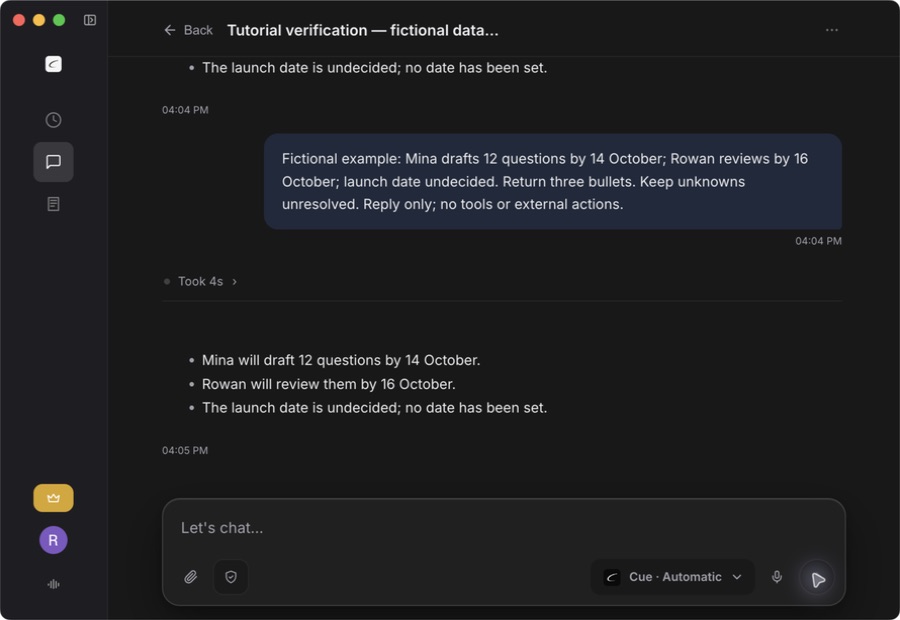
This separate fictional example asks Cue to retain two owners and deadlines while keeping an undecided launch date unknown: Mina drafts 12 questions by October 14, and Rowan reviews them by October 16. The point is the acceptance check: compare each returned bullet with the input, including what the input does not establish.
Frequently asked questions
What is Cue's published privacy boundary?
Cue keeps local copies. When you sign in, thread messages and preferences sync through Cue. Relevant request context may be sent to service providers. See the Privacy Policy.
Is Manus only a cloud agent?
No. Manus documents My Computer for local tasks on macOS and Windows, and Browser Operator for an authorized local browser session. Compare the specific permissions and task you need, rather than treating this as desktop versus cloud.
How should I verify Cue workflow support?
Current permissions and supported workflows are shown in the Cue desktop app. Review them before enabling access, and test the exact app and task you plan to use.
Can I dictate into Manus with Cue?
If the Manus input field accepts Cue Dictation in your installed setup, focus the field, dictate a short test, and check the inserted text before submitting. This is text input, not a Manus connector in Cue. It does not transfer Cue's conversation history, files, permissions, subscription, or model access.
Compare the current Cue and Manus product, platform, plan, and privacy information, then test each tool with the same representative workflow before deciding.